Q4 is here, and many teams are giving Performance Max more budget and letting automation do the work. Bot traffic can ride along with that spend.
Here's the catch. Performance Max (often called Google PMax) decides where your ads can run and optimizes toward the conversion signals you provide. If bots get into that loop, you don't just lose clicks. You can also give the system a distorted signal about what a valuable conversion looks like.
This guide covers how bot traffic reaches PMax, what to check in your account, and what to fix during peak season.
The Real Risk Isn't the Fake Click. It's the Signal It Creates.
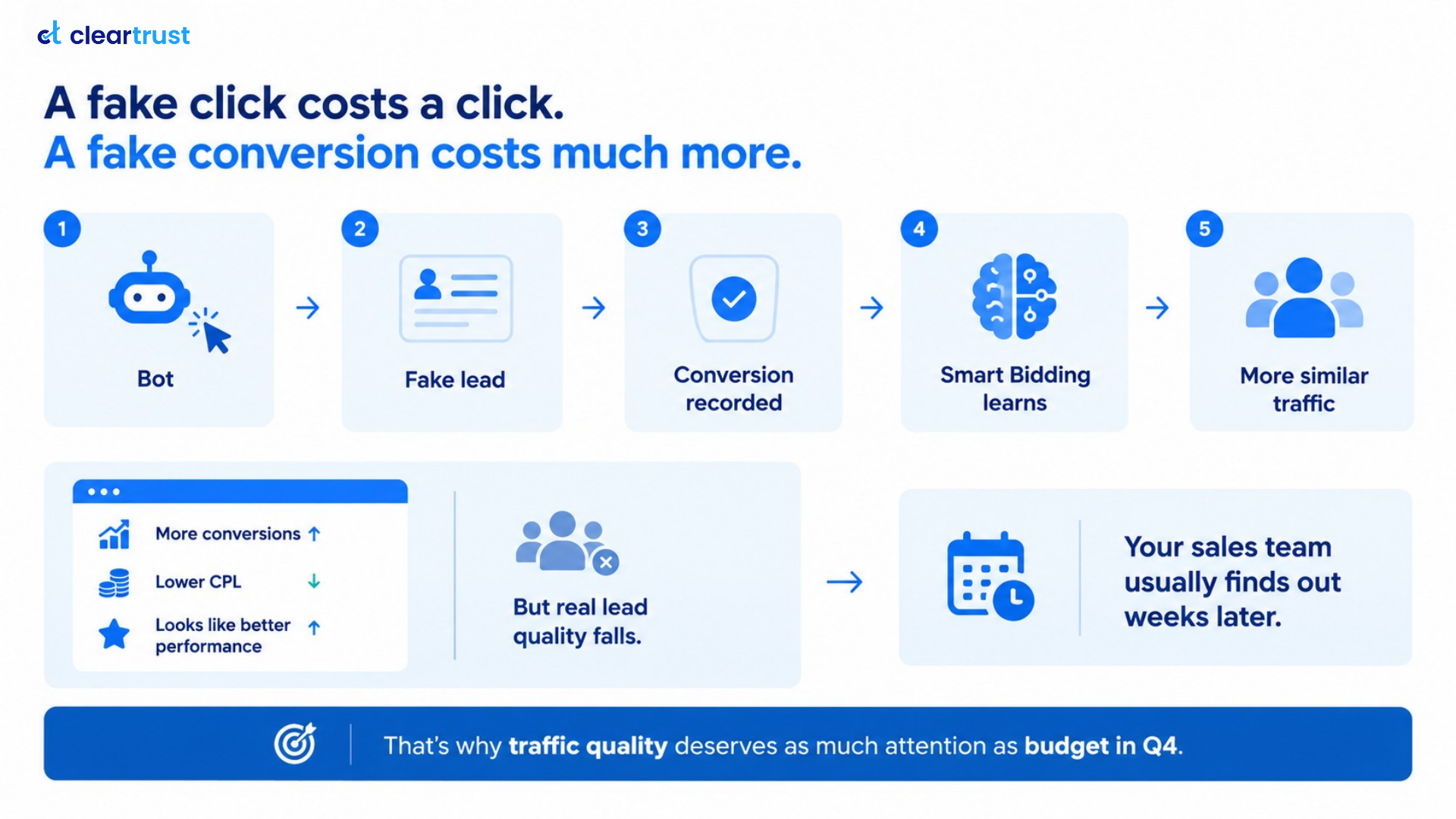
A fake click wastes the cost of one click. A fake conversion can do more damage because it gives your bidding system a misleading signal about what a valuable outcome looks like.
Here is the chain:
Bot visits and submits a form → fake lead is recorded as conversion → Smart Bidding treats it as a win → It bids for similar traffic →Dashboard looks better, lead quality falls
Meanwhile, your dashboard can show more conversions, a lower cost per lead and apparently better performance, while real lead quality falls. Your sales team usually finds out weeks later.
That is why traffic quality deserves as much attention as the budget in Q4. The rest of this guide follows that chain.
Why Performance Max Attracts Bot Traffic
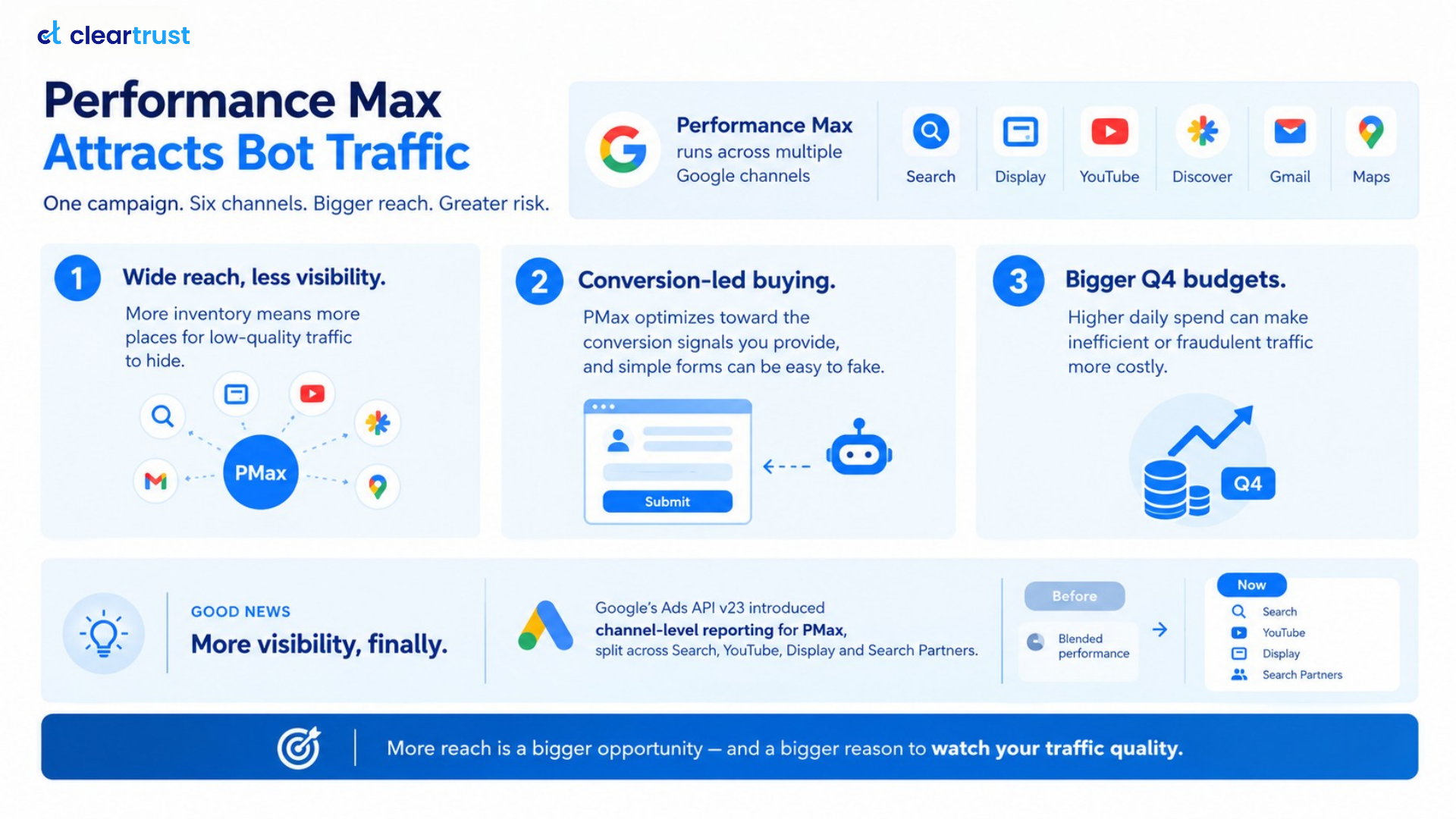
One Performance Max campaign can run across Search, Display, YouTube, Discover, Gmail and Maps, as Google's own lead generation guidance describes. That reach is one of PMax's biggest advantages. It also makes traffic-quality monitoring more important.
- Wide reach, less visibility. More inventory means more places for low-quality traffic to hide.
- Conversion-led buying. PMax optimizes toward the conversion signals you provide, and simple forms can be easy to fake.
- Bigger Q4 budgets. Higher daily spend can make inefficient or fraudulent traffic more costly.
There is some good news. you can now see where PMax results come from. In Google Ads, open a Performance Max campaign and find the channel performance report here:
Campaigns → your PMax campaign → Insights and reports → Channel performance
Google's help page on the report explains how to read it, and the channel table includes Search Partners as its own line. The Google Ads API added the same breakdown in version 23, as Search Engine Land reported. Before that, most of it came back as one blended figure. Channel data is available for dates from June 2025.
Performance Max, Search Partners and Invalid Traffic
Search Partners are third-party sites and apps that show Google search ads. They have been a transparency question for years.
In 2023, research firm Adalytics reported that Google search ads appeared on questionable sites, including sites some brands had tried to block. Google disputed the findings, saying the examples came from a very small part of the network.
Google then temporarily let PMax advertisers opt out of Search Partner inventory until March 1, 2024, and added impression-level placement reporting for those sites. Since that month, account-level placement exclusions also apply to the Search Partner Network, PMax included. That gives advertisers a practical way to act on problematic placements.
The Adalytics report was about brand safety and transparency. It doesn't prove every partner's click is fake. Treat Search Partners as something to audit, not something to assume is bad.
SIVT vs GIVT in Google Ads
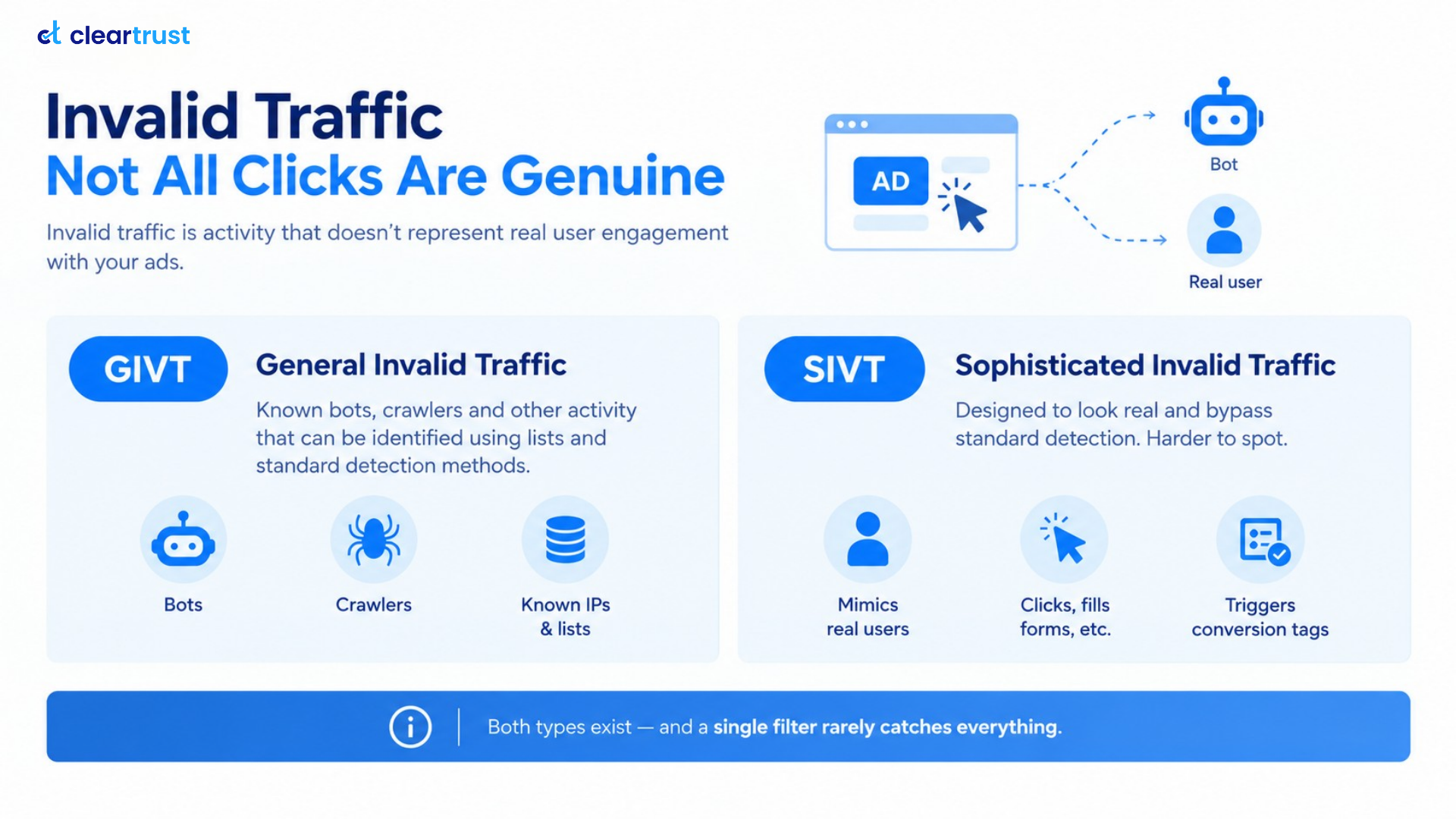
Invalid traffic refers to activity that does not represent genuine user engagement with an ad or advertising environment. The MRC and IAB broadly distinguish between two categories:
- GIVT (general invalid traffic): known bots, crawlers and other activity that can generally be identified using established lists, routine filtering and standard detection methods.
- SIVT (sophisticated invalid traffic): invalid activity designed to resemble legitimate users or evade standard detection methods. It generally requires more advanced analysis to identify.
GIVT is generally easier to identify because it often matches known patterns or lists. SIVT is harder because it can mimic legitimate user behavior, including browsing, clicking, filling in forms and triggering conversion tags. That makes it particularly relevant when fraudulent activity becomes part of your bidding signal.
For a deeper look, see our guide to sophisticated invalid traffic. Google's Ad Traffic Quality team also describes invalid activity as a mix of accidental and deliberate traffic, which is why a single filter rarely catches everything.
Does Smart Bidding Optimize for Fake Leads?
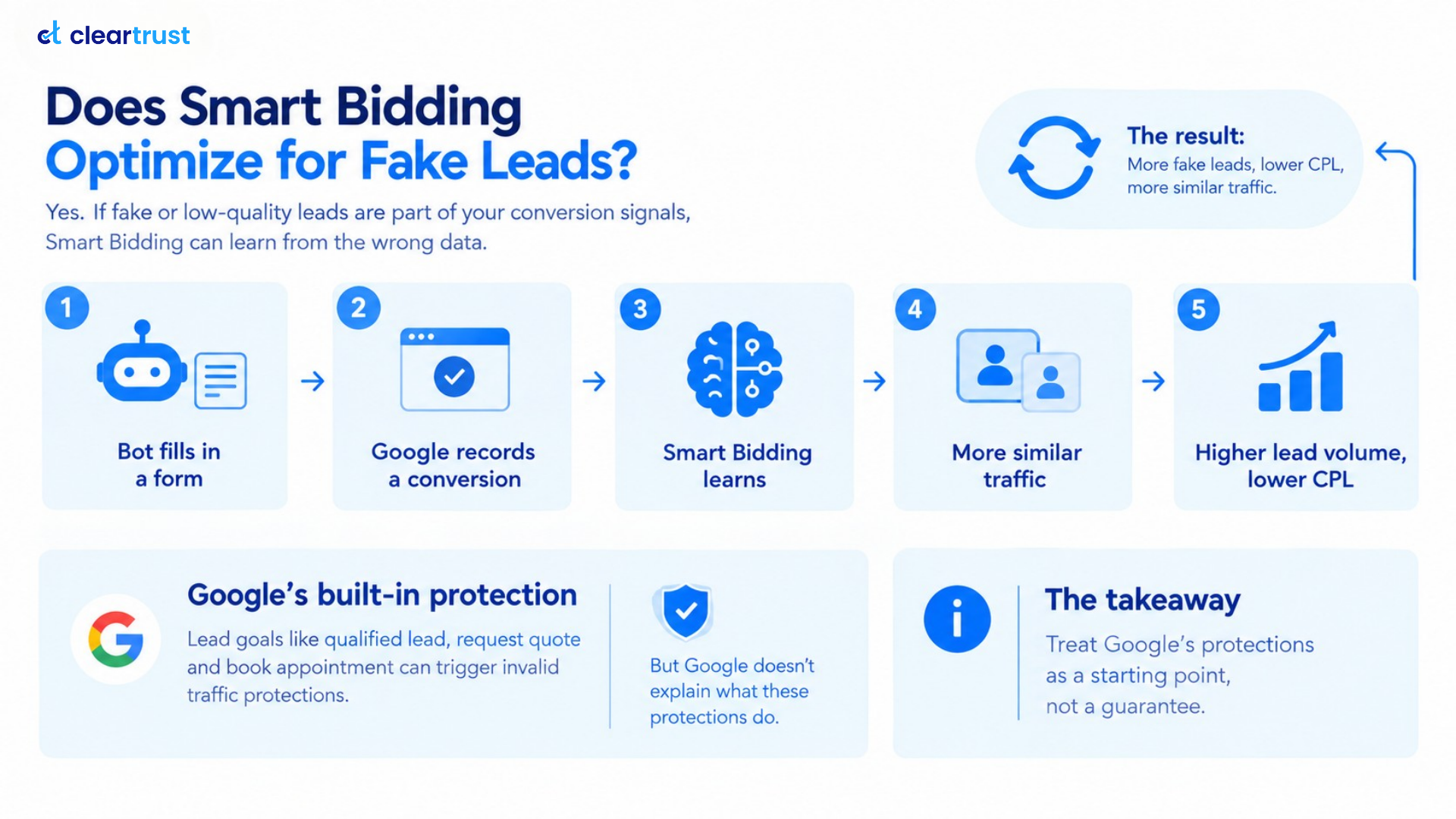
It can. Smart Bidding optimizes toward the conversion signals you give it. If those signals include fraudulent or low-quality leads, the system can learn from a distorted picture of what a valuable conversion looks like.
Search Engine Land describes one version of this loop: a bot fills in a form, Google records a conversion, and the resulting signal can influence the system toward similar traffic. Nothing looks broken. Lead volume rises and cost per lead falls. We cover a related pattern in Can High-CTR Traffic Still Be Ad Fraud?
Google does offer protection, but it has limits. Its Performance Max lead generation guidance says lead-specific goals such as Qualified lead, Request quote and Book appointment give you enhanced protections against invalid lead activity. Yet this September Google published a help page, Prevent invalid leads, which says its invalid-traffic filters don't stop invalid leads on their own, because most checks run after the ad serves. It calls lead quality a shared responsibility, and PPC Land covered the change. Treat Google's protections as a starting point, not a guarantee.
ClearTrust Insight: In ClearTrust's internal analysis of more than 1 billion daily sessions across 100+ brands, invalid lead rates in some campaigns reached 25–40%.
MFA Sites: Another Traffic-Quality Risk to Watch
MFA stands for made-for-advertising: sites built to host ads rather than serve readers. MFA isn't the same as fraud. The visitors can be real people, but the resulting clicks may still be accidental, low-intent or otherwise poor-quality.
It can contribute to the same problem: clicks and conversions that don't reflect meaningful purchase intent can muddy the signal your bidding learns from.
The scale is hard to pin down for Google specifically. The best-known figure comes from programmatic advertising. The ANA's 2023 study found only 36 cents of each dollar reached working media, with MFA among the leaks. The ANA also advised buyers to exclude MFA sites unless they want them. That study covered the open web, not Google PPC, so use it as context rather than a PMax statistic.
In Google Ads, the practical steps are:
- Open the Performance Max placements report and look for sites and apps with many impressions but no real value.
- Don't treat every MFA placement as fraudulent. Look for placements that consistently generate impressions or clicks without meaningful engagement or qualified outcomes.
- Add problematic placements to your account-level placement exclusions.
- Remember the report exposes impression metrics, so check lead quality separately.
- Repeat monthly, and weekly during peak season, because new sites appear all the time.
A Q4 Checklist for Google Ads Search and PMax
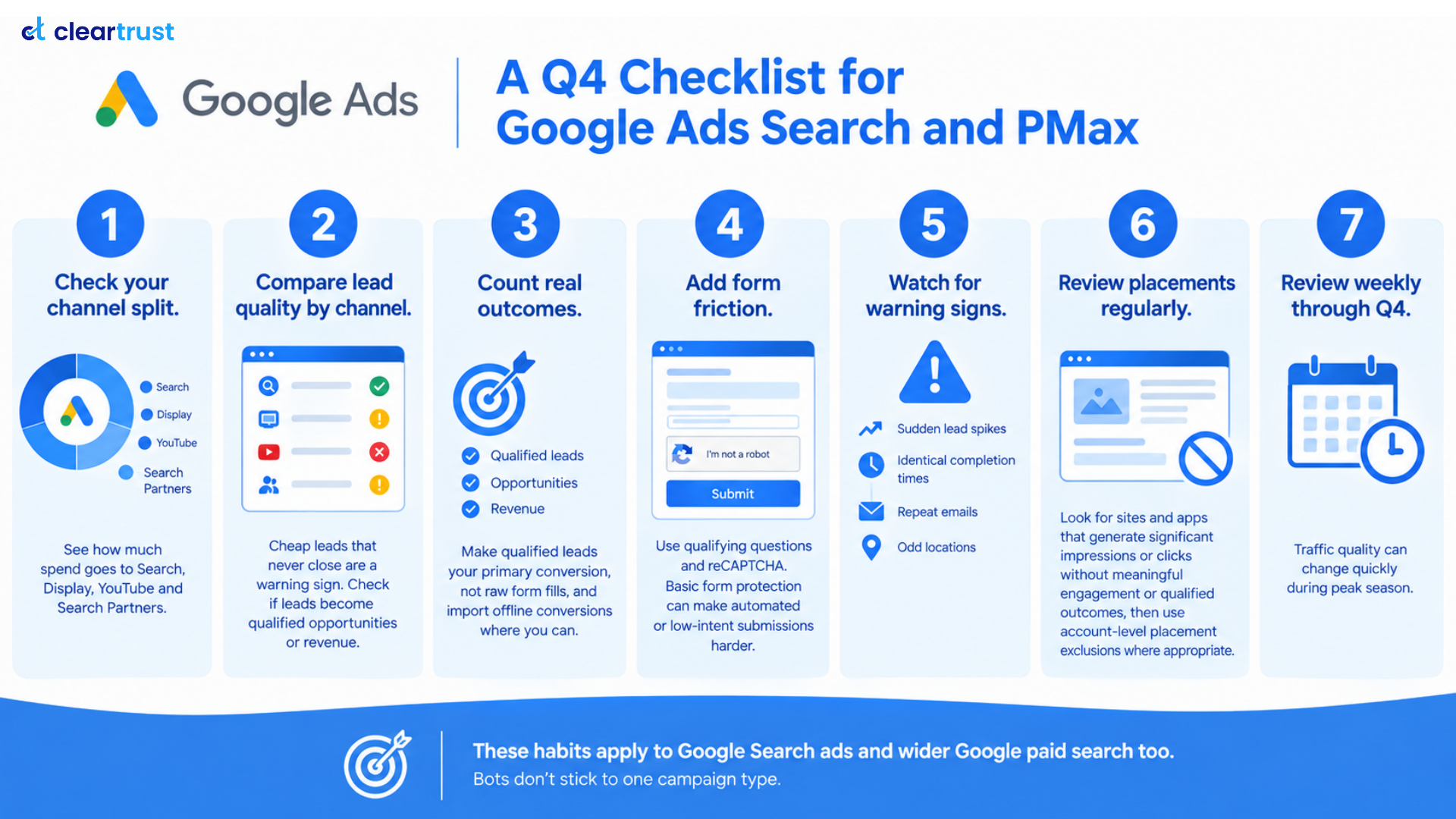
- Check your channel split. Use the channel performance report to see how much spend goes to Search, Display, YouTube and Search Partners.
- Compare lead quality by channel. Cheap leads that never close are a warning sign. Don't stop at detecting invalid clicks or submissions. Check whether those leads become qualified opportunities or revenue.
- Count real outcomes. Make qualified leads your primary conversion, not raw form fills, and import offline conversions where you can.
- Harden your lead forms. Google recommends reCAPTCHA, double opt-in email confirmation and server-side validation of emails and phone numbers. Qualifying questions can also make low-intent submissions harder.
- Watch for warning signs. Sudden lead spikes, identical completion times, repeat emails and odd locations.
- Review placements and lead quality on a schedule. Check monthly as a baseline and weekly through peak season. Add placements that bring impressions or clicks without qualified outcomes to your account-level exclusions.
These habits apply to Google Search ads and wider Google paid search too. Bots don't stick to one campaign type.
How ClearTrust Can Help
ClearTrust gives you an independent, session-level view of traffic quality that complements Google's campaign and conversion reporting. Here is how that supports the steps above:
- TQI Score™ evaluates traffic using 150+ customizable filters and session-level behavioral and technical signals to identify bots, invalid clicks and sophisticated invalid traffic. It works as a risk score: a higher TQI Score™ means higher risk, not higher quality.
- Lead validation helps keep fake and invalid leads out of your CRM.
- Custom lists and rules let you block risky sources and set your own logic.
Cleaner traffic and better-qualified conversion signals give Google a better input to optimize against. The goal isn't simply to remove bots; it's to make sure the conversion signals feeding Smart Bidding better reflect the users and outcomes you actually want.
Want to see how much invalid traffic could be affecting your acquisition costs? Try the Lead Fraud ROI Calculator.
Want a deeper analysis of your traffic quality?
See how ClearTrust can help identify invalid traffic.
Key takeaways
- Bots hurt Performance Max most when they trigger conversions, because Smart Bidding learns from those signals.
- Check your channel split, placements and lead quality before peak season spend grows.
- Optimize for qualified leads, not raw form fills.
FAQs
How do I stop bot traffic in Performance Max campaigns?
Start with the channel and placement reports to find weak sources, then add account-level placement exclusions. Count qualified leads, not raw form fills, as your main conversion. Add reCAPTCHA or qualifying questions to forms, and use an independent traffic-quality layer such as ClearTrust's TQI Score™, where a higher score signals higher risk, to identify additional invalid or low-quality traffic signals that standard platform filters may not fully explain.
Does Smart Bidding optimize for fake leads?
Yes, it can. Smart Bidding learns from whatever conversions you report. If fake or low-quality leads are counted, it can bid for more traffic like them. Optimizing for qualified leads and importing offline conversions gives it better data to learn from.
What is the difference between SIVT and GIVT in Google Ads?
GIVT is general invalid traffic, such as known bots and crawlers, which can often be identified using established detection methods. SIVT is sophisticated invalid traffic, designed to resemble legitimate users, and needs deeper analysis to detect. It can browse, click and submit forms, which makes it harder to separate from real activity.
How do I block MFA sites in Google PPC campaigns?
Review your placement reports for low-value sites and apps, then add them to your account-level placement exclusions. Performance Max manages exclusions at the account level, not per campaign. Repeat the review monthly, because new made-for-advertising sites appear constantly.
Do Performance Max campaigns run on Search Partners?
Yes, they can. Google's PMax channel reporting lists Search Partners as a channel. Google also says account-level placement exclusions apply to the Search Partner Network, so you can block specific partner sites that deliver poor traffic.